
Google Ads getting clicks but no leads is a painful pattern. Money leaves the account every day. The dashboard shows activity. Yet the phone stays quiet, the enquiry form remains empty, or the few leads that arrive are not serious buyers.
The first reaction is often to raise the budget, change every keyword, or blame Google Ads. That can make the problem worse. A click only proves that someone noticed the advertisement. It does not prove that the person needs the service, fits the target customer profile, or trusts the landing page enough to enquire.
When Google Ads is not generating leads, the cause normally sits in one of five places: measurement, traffic quality, targeting, the ad-to-page journey, or lead qualification. The fastest way to improve results is to find the broken step before changing the rest of the campaign.
The phrase “Google Ads not generating leads” can describe two different problems: real enquiries are not being measured, or the campaign is genuinely failing to create them. This guide helps you tell the difference.
Google Ads can receive clicks without generating enquiries when conversion tracking is broken, keywords attract researchers, targeting is too broad, the advertisement makes the wrong promise, or the landing page creates friction. Start by submitting a test enquiry and confirming that it appears as a conversion. Then review actual search terms, user locations, the bidding goal, mobile usability, and the quality of the leads being sent back to Google.
Do not increase the budget until these checks are complete. More money will scale the campaign's current behaviour, including its mistakes.
Before editing bids or writing new ads, compare what you see with the table below.
| What is happening? | Most likely issue | First check |
|---|---|---|
| Enquiries arrive, but Google Ads shows zero conversions | Measurement problem | Conversion tag, event, and conversion status |
| Many clicks, but no form submissions | Post-click problem | Mobile landing page, offer and form |
| Enquiries come from students, job seekers, or unrelated locations | Traffic problem | Search terms, negatives and location settings |
| Leads arrive, but few are suitable | Qualification problem | Ad wording, form questions and CRM outcomes |
| Call, or WhatsApp clicks appear, but conversations do not start | Contact-path problem | Button, number, prefilled message and response process |
This order matters. If measurement is wrong, every later decision is based on unreliable information. Google's own conversion measurement guidance says conversion data helps advertisers identify which keywords, ads, ad groups, and campaigns drive valuable customer actions. It also powers conversion-focused bidding.
Sometimes leads happen, but they aren’t being recorded. A form email may reach the sales team while the Google Ads conversions column stays at zero. A WhatsApp button may be counted as a lead even when the user never sends a message. A thank-you-page tag may fire twice and inflate the numbers.
Test every conversion path yourself:
Google recommends checking tag implementation and conversion-action status when recorded conversions are missing or lower than expected. Google Tag Assistant can help verify whether the intended tag fires.
Fix: Define a completed form, a qualified phone call, a sent WhatsApp conversation, or a confirmed booking as the real conversion. Keep softer actions, such as page views, button clicks, and form starts for observation rather than treating them as equal to a lead.
Monitor: Conversion status, recorded leads versus CRM leads, and duplicate events.
Correct tracking isn’t enough if the campaign is told to optimise for an action with little business value. A page view is easier to generate than a sales enquiry. A button click is easier than a completed form. If these actions are the main bidding signals, the system can find more people likely to take the easy action rather than more buyers.
Google Ads separates primary conversion actions used for bidding from secondary actions used mainly for observation. Review the campaign’s goals and ask one question: “If Google produces more of this action, will it create more sales opportunities?”
Fix: Use completed enquiries, booked appointments, qualified leads, or converted leads as primary goals where the campaign has suitable tracking and data. Treat page views, time on site, and form starts as diagnostic signals.
Monitor: Cost per completed enquiry and cost per qualified lead, not only total conversions.
Two searches can mention the same service but carry very different intent:
Broad, general keywords often look attractive because they produce impressions and clicks. They can also attract students, job seekers, DIY users, and people comparing information with no plan to contact a provider.
Open the Google Ads search terms report and classify the searches that spent money. Mark each one as buying, comparing, re
searching, or irrelevant. Google’s official search terms documentation explains that this report shows the actual searches that triggered ads, which can differ from the advertiser’s keyword list.
Fix: Prioritise keywords that describe the service, location, problem, and action. Use phrase or exact match when tighter control is needed. Do not choose a match type only because it sounds safer; judge it using real search-term and conversion data.
Monitor: Conversion rate and qualified-lead rate by search term.
Broad match is not automatically bad. It becomes expensive when it is combined with weak conversion signals and little search-term control. A relevant-looking keyword can match searches for courses, salaries, templates, jobs, or services the business does not provide.
Possible Google Ads negative keywords for a service campaign may include “free,” “jobs,” “salary,” “course,” “training,” “internship,” “meaning,” and “PDF.” But never copy a generic negative list without checking the business. A training company, for example, should not block “course.”
Fix: Review the search terms report every week during early optimisation. Add only genuinely irrelevant searches as Google Ads negative keywords. Keep a shared list for repeated exclusions and campaign-specific lists for local needs.
Monitor: Wasted spend from irrelevant searches and search-term conversion rate.
“Am I targeting the wrong people with my Google Ads?” is a useful question because the keyword may be correct while the user is not.
Check where the click came from, which device was used, when it happened and whether the business can serve that person. This is especially important for Indian service businesses covering selected cities or states. A Chennai company targeting all of India may pay for enquiries it cannot fulfil. A local clinic or home-service provider may attract users interested in the location but not physically present there.
Google explains that advanced location options can include or exclude people based on where they are likely to be located and the places in which they have shown interest.
Fix: Review Google Ads location targeting, matched locations, devices, networks and ad schedules. For a strict service area, decide whether targeting people physically present in that area better matches the business model. Exclude locations that repeatedly spend without producing valid enquiries.
Monitor: Cost per qualified lead by location, device, network and hour.
Maximize Clicks aims to obtain clicks within the available budget. Maximize Conversions and other Smart Bidding strategies focus on conversions or conversion value. That does not mean one strategy is always right and the other is always wrong. The correct choice depends on the campaign’s goal, data quality and maturity.
The important part of Maximize Clicks vs Maximize Conversions is the outcome each strategy is asked to pursue. If the business needs enquiries but the campaign is optimised only for visits, a busy dashboard can hide a weak sales pipeline.
Fix: Confirm that conversion tracking is trustworthy before moving to conversion-focused bidding. Avoid making several major changes at once. Give a significant change enough time to collect data before judging it, unless the campaign is clearly spending on irrelevant traffic.
Monitor: Conversion volume, cost per lead and cost per qualified lead—not CPC alone.
An advertisement can have a strong click-through rate and still produce weak leads. Phrases such as “best service,” “lowest price,” or “guaranteed results” attract attention but do little to qualify the buyer. They may also create an expectation the landing page cannot support.
A better advertisement tells users who the service is for, what problem it solves, where it is available, and what the next step involves. A B2B agency could mention “Google Ads management for service businesses” rather than the vague “Grow your business today.” A company serving Chennai and Bengaluru can state that coverage instead of paying for clicks from everywhere.
Fix: Add useful qualifying information without making the ad difficult to read. Match the headline to the target keyword. Use assets for calls, locations and relevant service details. Do not make claims that the business cannot prove.
Monitor: Qualified-lead rate by ad, not simply CTR.
Imagine clicking an ad for a “Google Ads campaign audit” and landing on a general homepage that mainly discusses branding, web design, and social media. The visitor must search for the promised service. Most will not.
This is a common reason for Google Ads clicks but no conversions. The user expects the landing page to continue the same conversation that started in the search and advertisement.
Fix: Match the keyword, ad headline, landing-page H1, offer, and CTA. A search for a Google Ads audit should lead to a page that explains what the audit covers, what the buyer receives, and how to request it. Use one main action, such as “Request a Google Ads Audit,” instead of several competing buttons.
Monitor: Landing-page conversion rate, engagement, and form-start-to-completion rate.
If the Google Ads landing page is not converting, test it on an ordinary phone using mobile data. Do not judge it only from a fast office desktop.
When reviewing a Google Ads landing page not converting visitors, begin with the exact journey promised by the advertisement. A beautiful page can still fail when its message, offer, or next step does not match the visitor’s search.
Check whether the page opens quickly, the main message is visible without zooming, the CTA appears early, and the form can be completed with one hand. Watch for intrusive pop-ups, shifting layouts, tiny fields, and a WhatsApp button covering the submit button.
Fix: Compress heavy images, remove unnecessary scripts, simplify the first screen and make call and WhatsApp options easy to use. Keep the page focused on the advertised service. Test the complete journey after every design or tracking change.
Monitor: Mobile conversion rate, landing-page load performance and form abandonment.
“Why isn’t my Google Ads contact form getting submissions?” should be answered with a real test, not guesswork.
A form may look fine while failing silently. The submit button may not work on one browser. An OTP may arrive late. Required fields may not be marked. Asking for company name, full address, budget, GST details, and a long project description before the first conversation can make a legitimate prospect leave.
Fix: Ask only what sales needs for the first response. For many service businesses, name, business email or phone number, required service, and one qualifying field are enough. Show a clear success message. Send an acknowledgement. Confirm that the lead reaches the right person.
Do not remove every qualifying question just to increase form volume. A shorter form can create more submissions, but also more Google Ads poor-quality leads. Find the balance between ease and qualification.
Monitor: Form starts, form completions, error rate, and qualified-lead percentage.
A visitor may understand the service and still hesitate. They may not know what happens after submitting the form. They may worry about being pushed into a sales call or wasting more money after a failed campaign.
Replace vague CTAs such as “Submit” with a clear next step: “Request a Campaign Audit,” “Discuss Your Lead Goal,” or “Get a Google Ads Review.” Explain what the person will receive and whether any commitment is required.
Support the decision with real proof: relevant campaign results, client reviews, clear contact details, an understandable process, and honest limits. Never use invented awards, inflated client counts, or anonymous testimonials that cannot be verified.
Fix: Place the offer, evidence and CTA close together. Address the buyer’s main doubt: “Will you diagnose the account, or simply ask me to spend more?”
Monitor: CTA click rate, completed enquiries, and sales-qualified leads.
Lead volume can look healthy while sales teams complain about quality. This happens when Google receives the same success signal for every form submission—whether it came from a serious buyer, a student, a vendor or spam.
The real journey is longer:
Ad click → Enquiry → Qualified lead → Proposal → Customer
To improve Google Ads lead quality, the advertising data should connect with business outcomes. Label leads inside the CRM. Where appropriate, send qualified-lead or converted-lead outcomes back to Google through offline conversion imports or enhanced conversions for leads. Google’s documentation explains that enhanced conversions for leads uses privacy-safe, hashed first-party data to improve measurement.
Fix: Agree on a clear definition of a qualified lead. Connect campaign identifiers and CRM stages. Respect consent, privacy, and applicable data policies.
Monitor: Qualified-lead rate, cost per qualified lead, proposal rate, and customer acquisition cost.
Google Ads poor-quality leads cannot be fixed by one setting. Quality improves when the full campaign filters and teaches the system consistently.
Start with these actions:
The goal is not the cheapest possible lead. It is a sustainable cost for a lead the sales team can realistically convert.
At Fuzion Grow, we do not start by increasing the budget. We first identify where the advertising money is leaking.
Confirm that completed forms, calls and WhatsApp enquiries are tracked as primary conversions. Then review location settings, networks, ad schedules and bidding goals.
Sort campaigns, keywords and search terms by cost. Divide them into three groups:
Also check whether each keyword matches the ad message and landing page. Relevant clicks with no enquiries usually point to a weak offer, form, or landing-page experience.
Focus first on the campaigns spending the most money. Make one major change at a time and track the cost per qualified lead. Increase the budget only after conversion tracking and lead quality are reliable.
A low budget can limit the number of auctions, clicks, and enquiries a campaign can receive. It does not explain every zero-lead campaign.
Suppose the expected cost per qualified lead is ₹2,000 and the daily budget is ₹300. The campaign may need several days to collect enough spend for a fair judgement. But if that ₹300 is buying searches for jobs, courses, or locations outside the service area, raising the budget will only waste money faster.
Estimate a workable testing budget using expected CPC, realistic landing-page conversion rate, and the value of a qualified lead. Use industry benchmarks only as a starting point; the business’s own search-term, sales, and conversion data should make the final decision.
Increase the budget when tracking is reliable, search intent is relevant, the landing page converts, and the sales team can handle additional qualified leads.
If Google Ads is getting clicks but no leads, pause the affected campaign when:
Keep testing when tracking works, searches show buying intent, and the landing page functions correctly. Check the number of relevant clicks, expected cost per lead, and sales cycle before deciding. Do not pause a campaign only because a few clicks produced no enquiries.
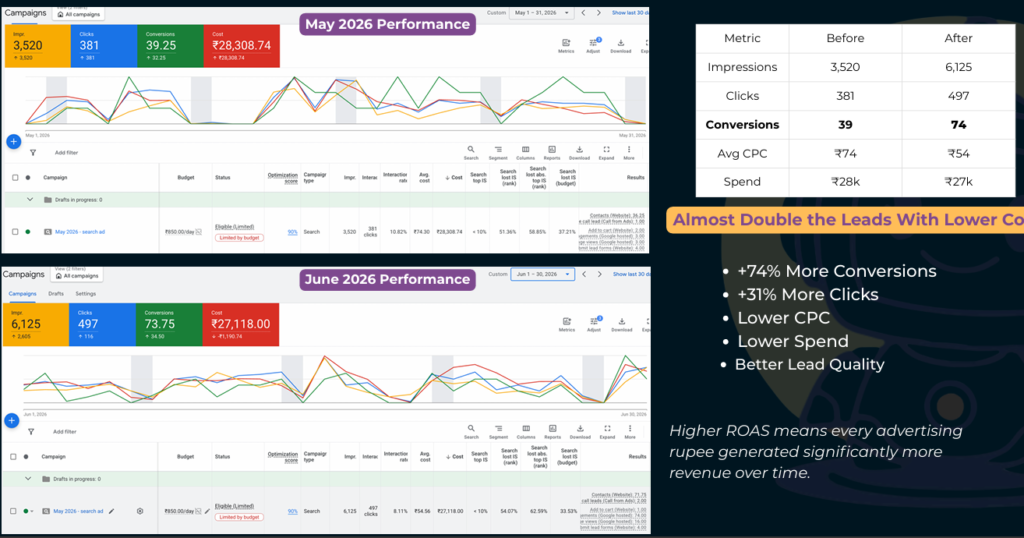
Fuzion Grow measures Google Ads performance by conversions and cost—not clicks alone. In one campaign, our optimisation increased recorded conversions from 39.25 in May to 73.75 in June 2026, an 88% increase. During the same period:
Our Google Ads campaign optimisation covers search intent, wasted queries, location targeting, conversion tracking, ad messaging and landing-page performance. We recommend increasing the budget only after the campaign produces measurable results.
If your Google Ads are getting clicks but no leads, Fuzion Grow can identify where potential customers are dropping off and create a clear plan to generate more relevant enquiries.
Google Ads getting clicks but no leads does not always mean the platform is failing. It means the path between the search and the sales conversation needs to be examined carefully.
Start in the right order:
Verify tracking → Remove irrelevant traffic → Correct targeting → Match the ad and landing page → Improve the contact journey → Track qualified leads
If Google Ads is not generating leads, resist the urge to change everything or raise the budget immediately. Find the first broken step, fix it, and measure the result. That approach protects the budget and gives the campaign a fair chance to learn from genuine customer actions.
Getting clicks is easy to report. Producing qualified enquiries at a sustainable cost is the real job. If you want a clear diagnosis of your keywords, conversion tracking, targeting, and landing page, speak with Fuzion Grow’s performance marketing team about a campaign review.